Guide
How to Get Photorealistic AI Images: 9 Prompt Techniques
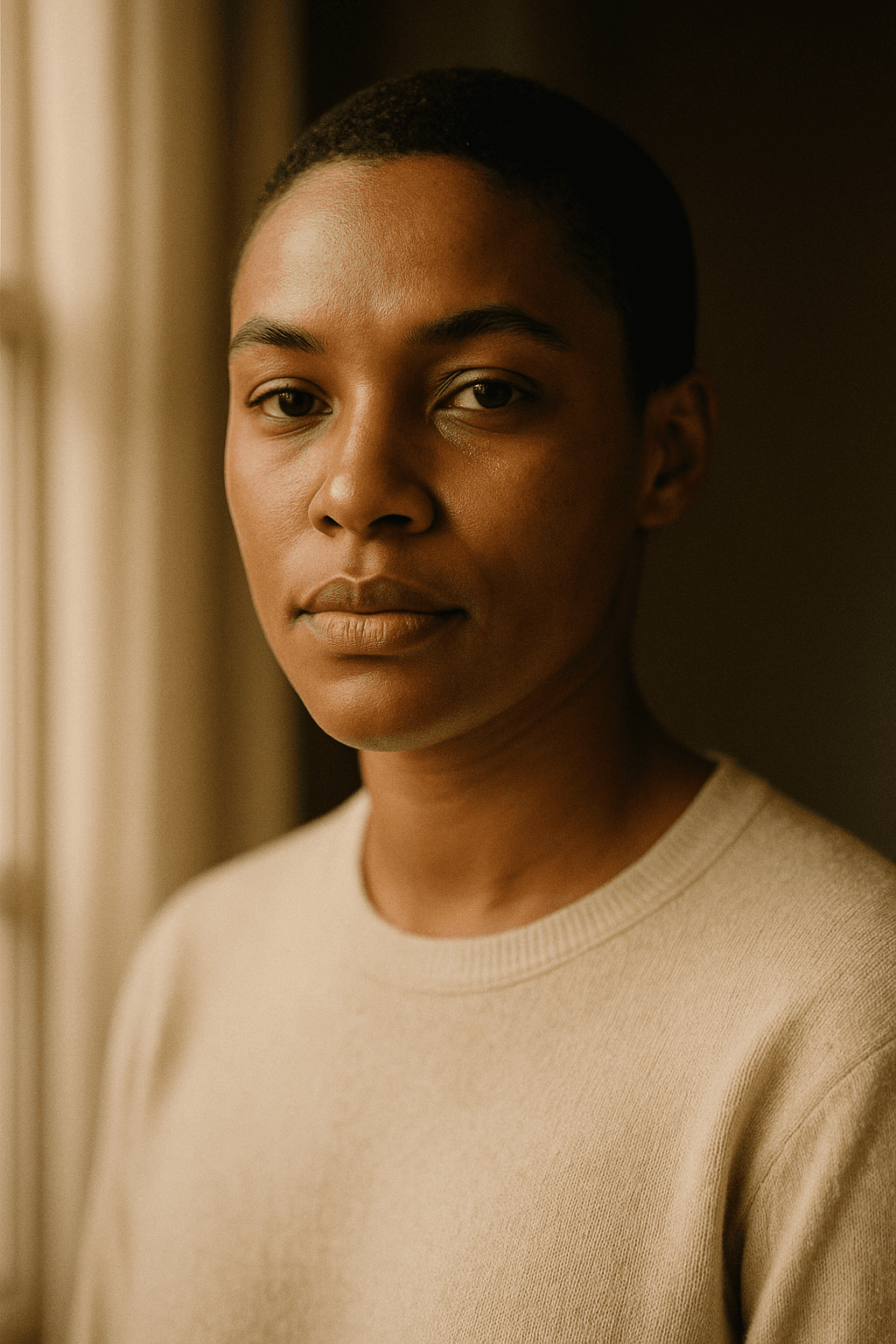
Why do AI images look fake in the first place?
Before the fixes, it helps to know what gives AI away, because every technique below targets one of these tells. The irony is that AI images often look fake by being too perfect: flawless skin, perfectly even lighting, hypersaturated colors, and a kind of glossy, airbrushed sheen that real cameras never produce.
The stakes are real. According to Conjointly (September 2025, 301 US adults), people now distinguish real from AI images at roughly chance level, about 50%, and only 9% correctly identified at least 70% of images, down from 25% in June 2023. In other words, when an AI image is done well, most people genuinely cannot tell. Your job as a creator is to remove the few cues that still give it away.
The common tells are a short list: plastic, textureless skin; lighting with no clear source or direction; oversaturated, candy-bright color; impossibly symmetrical faces; mangled hands, teeth, and text; and backgrounds that are too clean. The nine techniques each push against one of these toward the look of a real photograph.
What are the 9 techniques for photorealistic AI images?
Here is the full toolkit. You do not need all nine on every image, but the more of them you apply deliberately, the more photorealistic the AI image becomes. Each is phrased so you can drop it straight into a prompt.
- Describe a real camera and lens. Photographic language anchors the model to reality. "Shot on a 50mm lens, f/1.8" or "85mm portrait lens" tells it to render the optical signature of an actual photo, including natural perspective and depth.
- Name a concrete light source and direction. Lighting is the biggest lever on realism. Replace "good lighting" with "soft window light from the left," "golden-hour backlight," or "overcast diffused daylight." Real light has a source, a direction, and falloff.
- Add believable imperfection. Perfection reads as fake. Ask for "visible skin texture and pores," "slight natural asymmetry," "a few flyaway hairs," or "subtle film grain." These tiny flaws are what cameras capture and AI tends to erase.
- Keep the subject specific and human. Vague subjects average into uncanny results. Specify age, expression, clothing, and a natural pose: "a woman in her 40s, relaxed half-smile, mid-conversation," not "a beautiful woman."
- Use a negative prompt to kill AI tells. Exclude the giveaways directly: "plastic skin, airbrushed, oversaturated, extra fingers, deformed hands, text, watermark, CGI render, 3D." This is the fastest way to remove recurring artifacts.
- Set a realistic depth of field. Real lenses do not keep everything sharp. "Shallow depth of field, background softly blurred" or "deep focus, sharp throughout" tells the model how a real aperture would behave.
- Match color to reality, not to candy. Ask for "natural skin tones," "muted realistic colors," or "neutral white balance" to counter the model's tendency toward oversaturation. Real photos are rarely as vivid as default AI output.
- Tune guidance so the model does not overcook it. Very high guidance (CFG) can force a glossy, over-rendered look. If your tool exposes it, a moderate setting often produces a more natural, less plastic image.
- Refine locally instead of re-rolling. When 90% is photorealistic and only the hands or background are off, mask and regenerate just that region, or edit it directly, rather than gambling on a fresh roll that loses what worked.
Treat these as adjustable, not absolute. Camera-and-lens language and lighting do the most work for almost any scene, so start there, then layer in imperfection and a negative prompt before fine-tuning color, depth of field, and guidance.
Why is lighting the most important factor?
If you change only one thing in your prompts, make it the lighting. Light is what photography literally records, and our eyes are extremely sensitive to lighting that does not behave like real light. An image with no clear light source, or with light coming from impossible directions, reads as fake even when every other detail is perfect.
Concrete lighting descriptions also do double duty: they set mood and they force the model to render physically consistent shadows and highlights. "Soft window light from the left" implies a gradient across the face, a catchlight in the eyes, and shadow falloff on the right. "Golden-hour backlight" implies a warm rim of light and a slightly hazy, lower-contrast scene. The model can render these convincingly when you ask, and rarely when you don't.
The deeper reason precise wording works is in the research. The team behind Google's Imagen found that scaling the language understanding of a text-to-image model improved photorealism and text-image alignment more than scaling the image generator itself. Modern models genuinely understand photographic and lighting vocabulary, so spending your words on real light pays off directly in realism.
Weak vs photorealistic: what does an upgrade look like?
The fastest way to internalize the techniques is to see generic prompts rewritten for realism. Each row shows the tell being removed and the photographic language that replaces it.
| Generic prompt | Why it looks fake | Photorealistic rewrite |
|---|---|---|
| a beautiful woman, high quality | Subjective filler, no light, no camera; defaults to plastic skin | a woman in her 40s, relaxed half-smile, visible skin texture, soft window light from the left, shot on 85mm f/1.8, shallow depth of field, natural skin tones |
| a stunning landscape, 4k | No light direction, time, or lens; oversaturated by default | misty alpine valley at sunrise, low golden light through fog, wide-angle 24mm lens, deep focus, muted realistic colors, subtle haze |
| a product photo, professional | No material, light, or optics; reads like flat 3D render | amber glass bottle on wet concrete, single soft top-down studio light, 100mm macro lens, realistic reflections, natural color, fine surface detail |
| a happy family, perfect | Symmetry and flawlessness scream AI; no realism cues | a family of four on a sofa, candid mid-laugh, slight asymmetry, soft overcast window light, 35mm lens, natural skin texture, film grain |
| amazing food photo, vibrant | Hypersaturation is a classic AI tell; no light source | a bowl of ramen on a wooden table, warm side light from a nearby window, 50mm lens, shallow depth of field, natural muted color, gentle steam |
Notice the pattern: every rewrite trades superlatives ("beautiful," "stunning," "amazing") for a camera, a light, a material, and a deliberate imperfection. That swap, repeated, is most of the craft of photorealistic AI.
How do negative prompts make AI images more realistic?
A negative prompt is a list of things you want the model to avoid, and for realism it is one of the most powerful tools you have. Instead of hoping the model avoids plastic skin and oversaturation, you name those failures explicitly and push the image away from them.
A strong realism negative prompt usually covers four categories: the plastic look ("airbrushed, plastic skin, smooth, CGI, 3D render"), anatomical errors ("extra fingers, deformed hands, fused limbs, mangled teeth"), color problems ("oversaturated, HDR, neon"), and overlays ("text, watermark, signature, logo"). Combine the ones relevant to your image rather than pasting a giant block.
Negative prompts pair naturally with iteration: if a particular artifact keeps appearing, add it to the negatives rather than rewriting your whole prompt. For a fuller treatment of prompt structure, including positive and negative prompts together, see our guide on writing AI photo prompts, or start from a plain sentence in Text to Photo and add realism cues from there.
Does the AI image generator you choose matter?
Yes, and more than many people expect. Prompt technique gets you a long way, but the underlying model sets a ceiling. Different generators are trained differently, so each has a distinct default look, and some are far stronger at photorealism than others, particularly for skin, hands, and natural lighting.
When you evaluate the best AI image generator for realistic work, test it on the hard cases rather than easy ones. Generate close-up portraits and check skin texture and hands. Generate a scene with a clear single light source and check whether shadows fall consistently. Generate something with text or fine repeating patterns and check for smearing. A tool that handles these holds up under scrutiny.
LaFoto.ai is being designed around exactly this standard: realistic output by default, with prompt scaffolding and editing that target the common AI tells rather than papering over them. As a pre-launch product that is a statement of design intent, not a benchmark claim, so judge any AI photo generator, including ours, on the hard test cases above when it is in your hands.
What is the quick checklist for a photorealistic result?
Run this short list before you accept an image as photorealistic. It catches almost every remaining tell.
- Light: is there a clear source and direction, with consistent shadows and a catchlight in the eyes?
- Skin and texture: are there pores, fine lines, and natural imperfection rather than an airbrushed sheen?
- Hands, teeth, ears: correct count and shape, no fused or extra fingers?
- Color: natural and slightly restrained, not neon or HDR-bright?
- Optics: believable depth of field and perspective for the lens you named?
- Background: appropriately imperfect, not impossibly clean or repeating?
- Text and patterns: any in-image text or fine repeats rendered cleanly, not smeared?
If one item fails, fix that one thing with a targeted edit or a single-variable prompt change rather than re-rolling the whole image. That discipline, plus the nine techniques above, is what reliably turns a generic AI image into a photorealistic one. Refine the last 10% in the AI photo editor instead of gambling on a fresh generation.
Sources
- 01Photorealistic Text-to-Image Diffusion Models with Deep Language Understanding — Saharia et al., arXiv (accessed 2026-06-01)
- 02Imagen: Text-to-Image Diffusion Models — Google Research (accessed 2026-06-01)
- 03Can people still tell real photos from AI images in 2025? — Conjointly (accessed 2026-06-01)
- 04Prompt engineering — Wikipedia (accessed 2026-06-01)
- 05Diffusion model — Wikipedia (accessed 2026-06-01)
Často kladené otázky
- How do I make AI images look photorealistic?
- Describe a real photograph rather than an idea: name a camera and lens, a concrete light source and direction, and believable imperfection like skin texture. Add a negative prompt to remove tells like plastic skin and oversaturation, then refine locally instead of re-rolling.
- What is the single most important factor for photorealism?
- Lighting. Real photography records light, and our eyes notice immediately when light has no source or falls from impossible directions. Specify the light source, direction, and quality, and the model renders physically consistent shadows and highlights.
- Why do my AI images look plastic or fake?
- Usually they are too perfect: flawless skin, even lighting, and oversaturated color. Add visible skin texture and slight asymmetry, name a directional light source, request natural muted color, and use a negative prompt to exclude airbrushed, plastic, and CGI looks.
- What should I put in a negative prompt for realism?
- Target four categories: the plastic look (airbrushed, plastic skin, CGI, 3D render), anatomical errors (extra fingers, deformed hands, mangled teeth), color problems (oversaturated, HDR, neon), and overlays (text, watermark, logo). Use the ones relevant to your image.
- Does naming a camera and lens really help?
- Yes. Photographic language like "shot on 85mm, f/1.8" anchors the model to the optical signature of a real photo, including natural perspective and depth of field. It is one of the most effective realism cues you can add.
- Why does adding imperfection make AI images more realistic?
- Because real cameras capture imperfection that AI tends to erase. Skin pores, slight asymmetry, flyaway hairs, and subtle grain are exactly what flawless AI output is missing, so asking for them closes the gap to a real photograph.
- Can people tell AI images from real photos in 2026?
- Often not. According to Conjointly (September 2025, 301 US adults), people identified real and AI images at roughly chance level, about 50%, and only 9% correctly identified at least 70% of images, down from 25% in June 2023. Done well, AI images are hard to spot.
- What is CFG or guidance, and how does it affect realism?
- Guidance, or CFG scale, controls how strictly the model follows your prompt. Very high values can force a glossy, over-rendered look that reads as fake, so a moderate setting often produces a more natural, photorealistic image if your tool exposes the control.
- Which is the best AI image generator for photorealism?
- It varies, because models differ in default look and strength on skin, hands, and lighting. Test any candidate on hard cases: close-up portraits, a single clear light source, and in-image text. The one that handles those convincingly is best for realistic work.
- Should I re-roll or edit when an image is almost photorealistic?
- Edit. If 90% looks real and only the hands or background are off, mask and regenerate just that region or fix it directly. Re-rolling throws away the realistic parts you already have to gamble on a fresh, different image.
Napsal/a
The editorial team behind LaFoto.ai writes guides and comparisons on AI photo generation, held to a sourced, no-fabrication standard.
Číst dál
Buďte první, až se dveře otevřou
Přidejte se na čekací listinu pro brzký přístup k LaFoto.ai.
Dáváme studiu poslední závěrečné úpravy. Zadejte svůj e-mail a budete mezi prvními pozvanými.
Přidáte se k 4 200+ tvůrcům, kteří jsou již na čekací listině